
There's something different about running a world model on your own hardware: no latency, no buffering, and full control over the experience. You select a scene, and you can play it immediately, generated on the fly on your very own GPU. Your world model's dreams are yours alone to enjoy.
Biome is how we're putting that experience into people's hands. It's the open-source desktop client for Waypoint, our family of real-time world models. You browse a gallery of scenes, pick one, and the model generates continuous first-person gameplay from that starting point, all running locally. It is a portal that takes you from the Overworld into our model, and this metaphor has become central to Biome as a whole.
Biome was built in approximately 8 weeks by a small team. It's open source under GPL v3, and serves as the user-friendly frontend for our World Engine inference library. This is the story of how it came together.
Starting Point
At first, Biome did not exist: instead, we had a single codebase for the frontend of our online streaming solution; the application that would become Biome was this frontend running as a desktop application. Nearing the release of Waypoint-1, we decided to split the desktop client off into its own application. Our original reason for keeping them unified, sharing behavior and code between them, proved to not be as beneficial as we were hoping.
Biome started life proper on January 17. The initial stack was Tauri with React and plain JavaScript. Our choice of Tauri was driven by a desire for a consistent UI across operating systems and to appeal to our team's preference for Rust, while avoiding the size burden of an Electron application.
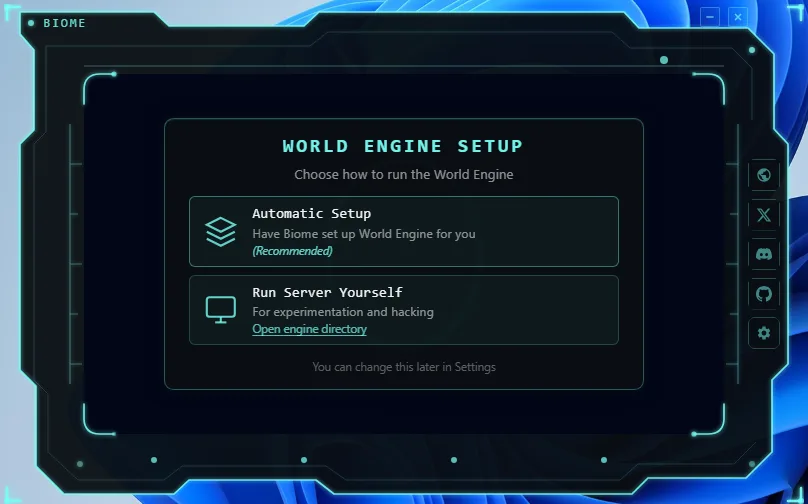
The initial version of Biome required you to connect to an inference server that you were running yourself. This state of affairs was remedied within days, as we added our new primary mode of operation: standalone, which sets up and runs the server for you behind the scenes. As anyone who has shipped a Python ML application to users will know, this is no small feat.
Supporting both standalone and server modes within Biome added complexity: we had to make sure that the decisions we made around the protocol and adjacent concerns made sense in both contexts. This, however, is something we simply could not compromise on. Standalone mode is core to our local-first philosophy - your machine, your worlds. Server mode exists for people who want to try the model but don't have a capable GPU - you can point Biome at a remote server and stream from there, with the understanding that you're trading latency for accessibility.
Our current inference stack is built around Python and its access to the ML ecosystem, which is why we run an inference server on the user's machine. In the future, we'd like to explore other methods of integration, including potentially porting the inference logic to an embeddable native library.
Making It Portable
On the subject of compromises that we refused to make: users should never have to install Python. They shouldn't need to know what a virtual environment is, and they definitely shouldn't find mysterious multi-gigabyte folders scattered across their home directory after installing our app.
We solved this by packaging uv, the Rust-based Python package manager, and operating it in a portable context. When Biome launches in standalone mode, it prepares uv, which in turn prepares its own Python. With that, we ensure that everything - the uv binary, its cache, the Python install, the virtual environment - lives next to the Biome executable, as chosen by you. Environment variables (UV_CACHE_DIR, UV_PYTHON_INSTALL_DIR, and others) ensure nothing touches the system Python.
We applied the same principle to model files. Hugging Face cache and model weights get pulled into the install directory, too. Where you install Biome is where the bulk of its data lives. No surprise 50 GB folders in ~/.cache. When you uninstall Biome, all of the resulting Python and models will go with it. You need not worry about anything lingering around, especially in an age where storage is getting increasingly expensive.
To help with this, our Windows installer was made intentionally upgrade-aware: it backs up user-provided scenes and models before upgrading, reducing the amount of churn involved in a reinstall. Biome is designed to be the kind of client that we would want to use, and that extends to not making light of the resources you have available.
The Tauri-to-Electron Migration
About five weeks in, we made a tough call. Tauri had been working without issue on Windows, but testing on Linux revealed that native webviews - usually, but not always, WebKitGTK - just didn't meet the standard we needed. We were seeing completely broken rendering, missing features, intra-application security failures, lacking support for features that shipped years ago, and more. We needed a consistent browser runtime or at least a consistent quality bar, and Tauri doesn't offer an option for that yet.
So, after some grumbling, we pulled the trigger and switched to Electron. This is not a development that we were entirely happy about. This would cause our download size to grow, and we'd have to move away from using Rust, but our application looking and working as it should took priority. We were able to rationalize the downsides: the size of our Python libraries and models would rapidly dwarf the application itself, and we were already using TypeScript on the frontend.
The migration itself took one day, thanks to Claude Code. The bulk of the work was in translating the Rust backend to a TypeScript backend and ensuring that all functionality was cleanly ported over. Everything else remained largely the same: the frontend was able to speak to the Python server just the same (through its existing WebSocket protocol), and the scope of the changes was otherwise limited. We're happy to say that we were back on track relatively quickly.
At the same time, we were completing a broader cleanup: migrating the entire frontend from JavaScript to strict TypeScript. The codebase had started as JS, an early decision made in the heat of the moment, and one we'd been paying for in subtle bugs and missing type information. Correcting it alongside the framework migration allowed us to wrap up our bulk-refactoring work in one go and move on.
The Redesign
When the original client was built, the design was largely ad-hoc with a vague aesthetic rooted in concepts of cyberspace. This design was aimed at the web client first, and made affordances for such: a non-rectangular window frame and UI extending into the infinite space of the page. Unfortunately, these details did not translate well to the desktop application, where windows are expected to be rectangular; we had to add floating hover buttons and resize handles, and the first version of Biome never felt truly at home on desktop.
Over the last few months, Overworld has found its aesthetic: a humanistic one, centered around empowering our users to partake in our worlds, whatever they may be, and intentionally divorced from the usual “AI aesthetic”. We chose to bring this attitude to Biome, and it is much better for it.
After sketching out the design direction in Figma, we used our coding agents to rapidly materialize a draft version of the redesign in Biome, progressively rebuilding components as we went along. We went view-by-view, ensuring that the new design was desktop-first and prioritized both form and function. The agents continued to be a boon at this time, allowing us to iterate and nail down the specifics of the design.
One of the areas that received the most focus was the home screen, as depicted above. We wanted this space to be inviting and to draw your eye to a central glowing, gently bobbing portal to worlds beyond. A white spiral of strands surrounds the portal, and inside the portal, a blue vortex, reminiscent of operating systems and consoles of ages long past.
This was enabled by custom WebGL2 particle rendering. Screen-space quads with streak trails, multi-tap Gaussian bloom for the vortex, and offscreen edge detection to emit sparks from the portal rim were all created to our specifications by our agents and tuned manually to hit the right visual notes.
Behind the portal, looping video backgrounds of forests, waterfalls, and a sakura tree behind gentle rain - and more - establish a rotating gallery of scenes. This, as well as our minimalist UI design, was chosen to pull you into our Overworld. As our final spice, we added a light audio layer to the UI controls, including to the portal, to make the interaction feel just a bit more grounded.
Aside from this, we had other views to design and implement: the settings, pause menu, and scene selector. Normally, we would have defined a design system ahead of time and used that system across these views. Instead, we elected to build out each view largely independently and extract common components after the fact. This let us experiment with what was appropriate for each view, and then efficiently draw out the commonalities. As before, agents made this workflow possible. This kind of rework would have been deeply tedious before, but there is very little cost to growing and then trimming the codebase.
From a technical perspective, we made one decision that simplified the design problem enormously. The model outputs at a fixed 16:9 aspect ratio, which in turn means that Biome must also be 16:9. With this in mind, we chose to lock the aspect ratio to 16:9 and design around this, and define the majority of our design in terms of container query units. This means that the Biome UI will always be the same, no matter what resolution it is run at, and it will simply scale its one layout up and down. In the future, when we do support other aspect ratios, we do not foresee decoupling the layout from this constraint being a challenge.
Keeping It Together
Biome is not inherently a complex product: each of its features is not uniquely difficult to understand. It is the interaction between them that is problematic. WebSocket connection state, server process lifecycle, UI transitions, pointer lock, pause state, and engine mode switching all interfere with each other, and not getting them right leads to maddening bugs that are challenging to reproduce.
We addressed this with two explicit state machines. One governs portal state: the progression from main menu through loading to streaming, with guarded transitions that prevent impossible states. The other manages the streaming lifecycle: connection state, error flags, intentional vs. unexpected disconnects, and the ordering of side effects to avoid race conditions.
We didn't get these right the first time, or the second, or even the third time. Some upfront design would have helped, but it was difficult to capture the full complexity of the state space until we saw it misbehaving in practice. We iterated until they were solid, fixing a long tail of subtle bugs along the way.
For state management on the frontend more broadly, React Context and hooks were enough. The streaming lifecycle reducer is the most complex piece, and it's a plain reducer. For an app of this scope, avoiding complexity was paramount.
The other source of accidental complexity was the communication layer. Early on, the renderer talked to the standalone server through three separate channels: parsing stdout for status, REST calls for configuration, and WebSocket for frames and input. Each channel had its own error handling, its own lifecycle, its own failure modes. Debugging meant correlating events across all three.
We consolidated everything into a single unified WebSocket protocol. Every message is JSON with a type field. Push messages flow from the server (status updates, frames, logs, errors), commands flow from the client (input, pause, prompt changes), and an RPC layer handles request/response patterns where we need them. One connection, one protocol, much less to go wrong.
Building with Coding Agents
We've already discussed how we used agents in passing, but it's worth discussing in more detail.
Agents let a small team punch above its weight. The audio system is another good example. Agents scaffolded the entire audio pipeline, including creating synthesized placeholder sounds (sine sweeps, filtered noise for clicks and hovers) that we can use indefinitely until we have appropriate replacements. The use of audio to this extent would have otherwise been deprioritized. Across the board, the pattern was the same: nice-to-haves became shipped features.
Of course, they aren't a complete win. Agents are still prone to producing suboptimal code (the dreaded slop), and operators must remain vigilant. They duplicate constructs, re-declare constants that already exist elsewhere, and suffer from the consequences of a context-window-sized view of the codebase. They move fast, but they don't always move clean. Without a steady hand, the codebase will drift toward entropy.
Our solution has been periodic compaction passes - or, colloquially, deslop passes - where we review the codebase for consolidation opportunities, dead code, and patterns that have diverged when they should be shared. While we identify these opportunities, we let the agents execute them: they are just as good at destroying as they are at creating. As long as you do this regularly enough, the use of agents is a strong net positive.
What's Next
We're preparing the release of Waypoint-1.5, the next generation of our world model family - a significant step forward that we're excited to share more about soon. The next release of Biome will ship alongside it.
Beyond that, broader GPU support is on the roadmap, dependent on porting work in the World Engine. We're exploring new control mechanisms beyond seed images, and macOS packaging is planned once inference support catches up. There's a lot of surface area to cover, and it's the kind of work that benefits from being done in the open.
Biome is GPL v3 and fully open source. It's our entry point to the Overworld. If you've got a capable NVIDIA GPU and want to experience what real-time world models feel like on your own machine, try it. If you want to hack on it, build something different on top of it, or just poke around the code, even better. We built it because we wanted these worlds to exist. Now we want to see what you do with them.